
When operating WordPress in a Chinese server environment, simply pasting a YouTube video URL into an article often fails to display the thumbnail image automatically.
In a standard WordPress environment, pasting a URL from major video platforms like YouTube triggers the oEmbed feature, which automatically generates an embedded player with a thumbnail.
However, this automatic embedding often does not work correctly on China-based servers.
This is due to China’s unique network regulations and technical constraints, requiring special handling when dealing with video content.
This article explains how to embed videos in WordPress, the specific limitations of China-based servers, and how to work around them.

There are two main ways to insert a video into a WordPress post:
| Method | Advantages | Disadvantages |
| ① Upload directly to local server | ○ Does not depend on external services ○ Fully controllable ○ Suitable for sites with access restrictions (e.g., private or limited access) | ○ Consumes server storage and bandwidth ○ May slow down site loading speed |
| ② Embed URL from external platform (e.g., YouTube) | ○ Saves server resources ○ Expects smooth playback ○ Benefits from social media sharing effects | ○ Depends on external services ○ Often fails in China server environments |
The following are major platforms supported for automatic embedding in WordPress (based on the Gutenberg editor).
Under normal circumstances (i.e., on servers outside of China), pasting a URL from these platforms will trigger automatic embedding.
* However, on China-based servers, the issues described in this article occur, particularly with YouTube, where thumbnails may not display.
| Environment | Major Platforms |
| Non-China WordPress environments (Gutenberg editor standard) | Amazon, Animoto, Cloudup, CollegeHumor, Crowdsignal, Dailymotion, Facebook, Flickr, Hulu, Imgur, Instagram, Issuu, Kickstarter, Meetup.com, Mixcloud, Reddit, ReverbNation, Screencast, Scribd, Slideshare, SmugMug, Someecards, SoundCloud, Speaker Deck, Spotify, TED, Tumblr, VideoPress, Vimeo, WordPress.tv, X (formerly Twitter), YouTube |
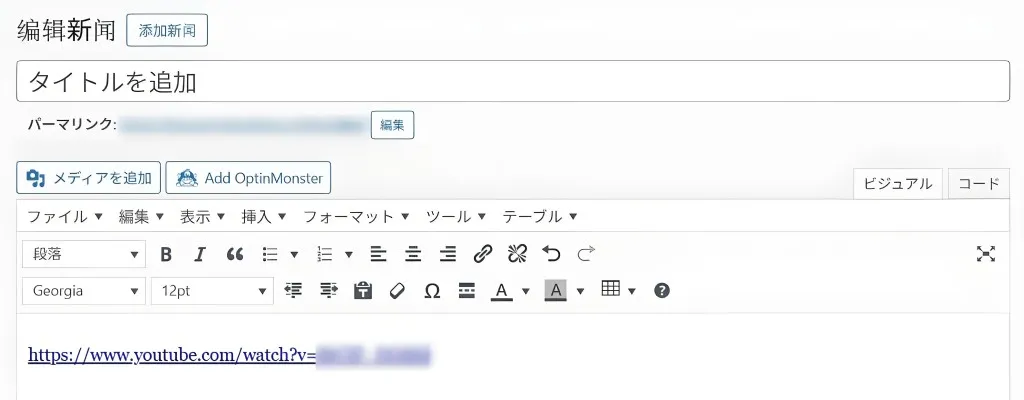
Here, we detail the issue using YouTube, a frequently used platform, as an example.
Normally, when you paste a YouTube link into the WordPress visual editor, it internally uses the oEmbed API to fetch meta information (thumbnail image, video title, etc.) from YouTube.
Consequently, it automatically converts the link into an iframe player with a thumbnail displayed within the post.
However, on a China-based server, this process fails, leading to issues like “thumbnail not displaying” or “video cannot be played.”
| Factor | Description |
| Blocked access to YouTube resources | Access to thumbnail images (e.g., https://img.youtube.com/vi/VIDEO_ID/hqdefault.jpg) and the oEmbed endpoint (https://www.youtube.com/oembed) is blocked. Consequently, WordPress cannot fetch metadata and fails to generate a thumbnail. |
| Firewall discarding requests | Requests from the China server to YouTube (especially for fetching thumbnail images) are discarded midway. This results in only an empty placeholder being displayed instead of the image. |
| WordPress oEmbed caching issue | In a normal WordPress environment, fetched oEmbed data is cached. However, on a China server, the initial request fails, so no cache is created, and thumbnails remain empty for subsequent attempts. |
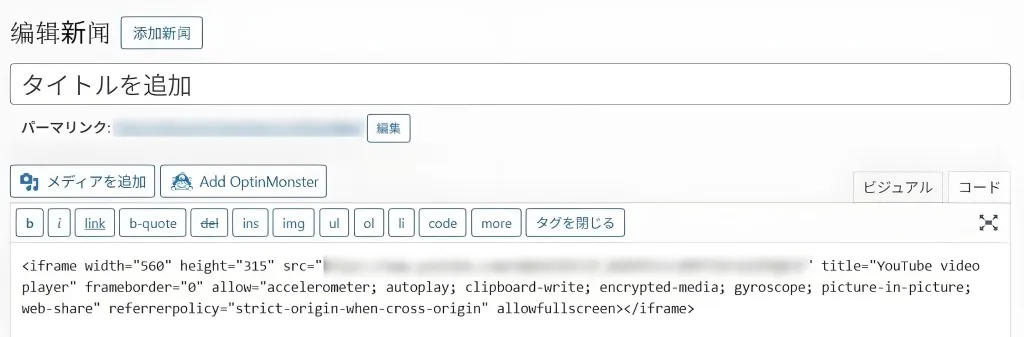
To work around these issues, instead of relying on automatic embedding, you can manually write the iframe code.
Specifically, directly write an iframe tag like the one below in the text editor (or a Custom HTML block) of your post.
<iframe width="560" height="315" src="https://www.youtube.com/embed/VIDEO_ID" frameborder="0" allowfullscreen></iframe>
* However, even when embedded this way, playback of the video itself will still be blocked from within China.
When operating WordPress in a Chinese server environment, you cannot realistically rely on YouTube’s automatic embedding feature.
If you want to display thumbnails or embedded players, you need to take steps like manually writing the iframe code.
Persistent failure to display video thumbnails can harm user experience and prevent the content’s value from being properly conveyed.
We recommend choosing a video delivery method (e.g., using “bilibili” for viewers within China) that considers the server’s location and your target audience.
| Website Development | https://beyond-shenzhen.cn/en/service/website |
| Managed Cloud Services | https://beyond-shenzhen.cn/en/service/server |
For Website Development & WeChat Solutions
▼ WeChat Official Enterprise Account ▼

▼ Contact Inquiry Desk on WeChat ▼


 WeChat Official Account
WeChat Official Account
WeChat Inquiry Desk




 【2026】Public Holiday Calendar for China, Japan, & Singapore