
As one of the largest information and knowledge platforms on the Chinese web, Baidu Baike commands strong authority and public trust.
For companies expanding into the Chinese market, having an official Baidu Baike page is an essential localization step and a powerful brand endorsement.
This guide walks you through the end-to-end creation process for companies from Mainland China, Hong Kong SAR, Macao SAR, and Taiwan region, as well as companies from other countries and regions.
Launched by Baidu, Baidu Baike is an open, collaboratively edited online encyclopedia designed to serve as a comprehensive Chinese-language knowledge hub.
The platform hosts over 30 million pages contributed by more than 8.03 million editors, spanning virtually every domain of knowledge.
* The latest official data from Baidu Baike as of January 2026
It successfully bridges wide reach with editorial depth, seamlessly combining the influence of keyword media with the trust of an authoritative knowledge platform.
When users search for a company name on Baidu, the company’s Baidu Baike page typically commands prime placement on the first page of search results, delivering sustained organic exposure at zero cost.
In January 2026, Baidu Baike officially launched its international edition under the name “BaiduWiki,” available in five languages: English, Spanish, French, Russian, and Japanese.
To date, BaiduWiki has published a total of 1 million entries.
| BaiduWiki | https://baike.baidu.com/en/index |
Before you begin, gather the following materials to maximize your chances of approval.
| Items | Details |
| Company Information | Mainland Chinese companies: Unified Social Credit Code
Companies from Hong Kong SAR, Macao SAR, and Taiwan region, as well as companies from other countries and regions: Full company name in Chinese or English (must exactly match the name on their local business registration certificate) |
| Reference Materials | Official company website: To verify foundational information such as the company profile and core business offerings
Authoritative news media links: To substantiate corporate honors, major milestones, and key developments |
| Basic Copy & Images | Company profile copy, development history copy, and a high-resolution company logo |
* Currently, the interface for all Baidu Baike pages is available only in Chinese.
| Baidu Baike Official URL | https://baike.baidu.com |
Visit the website, log in to your Baidu account, and click the “创建词条” (Create Page) button.
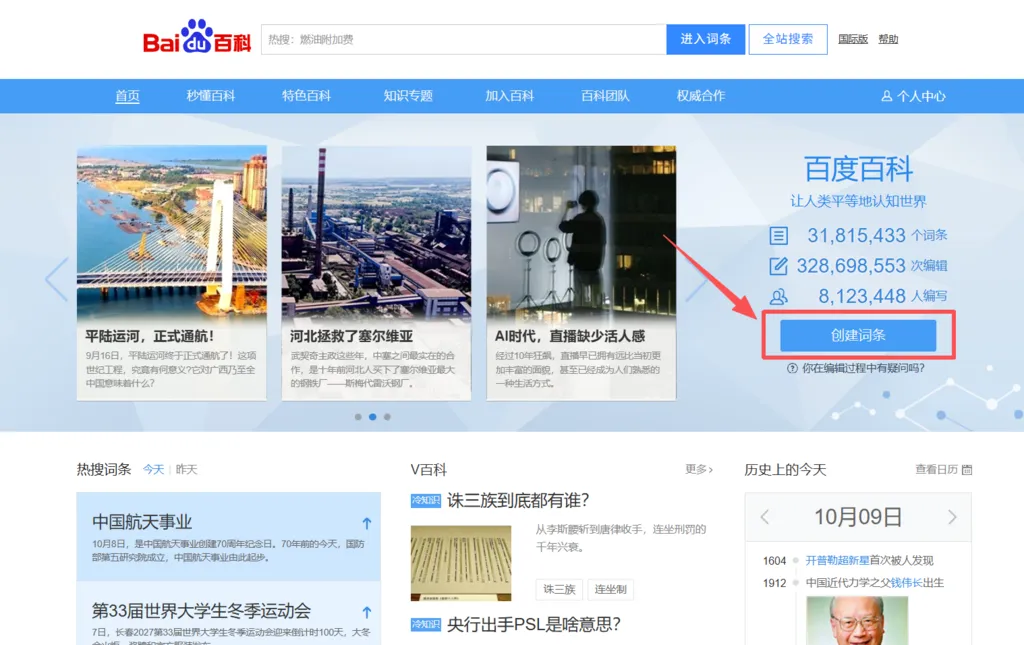
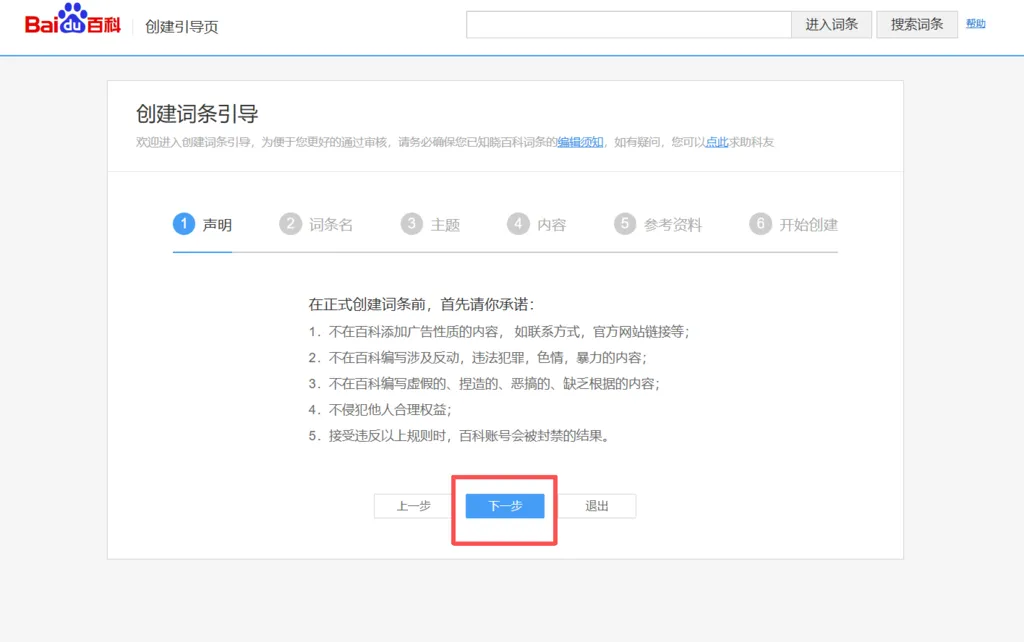
When you create a page for the first time, the system will automatically take you to the “Page Creation Guide.” You can review the guide or skip it, but we recommend reading through it carefully.
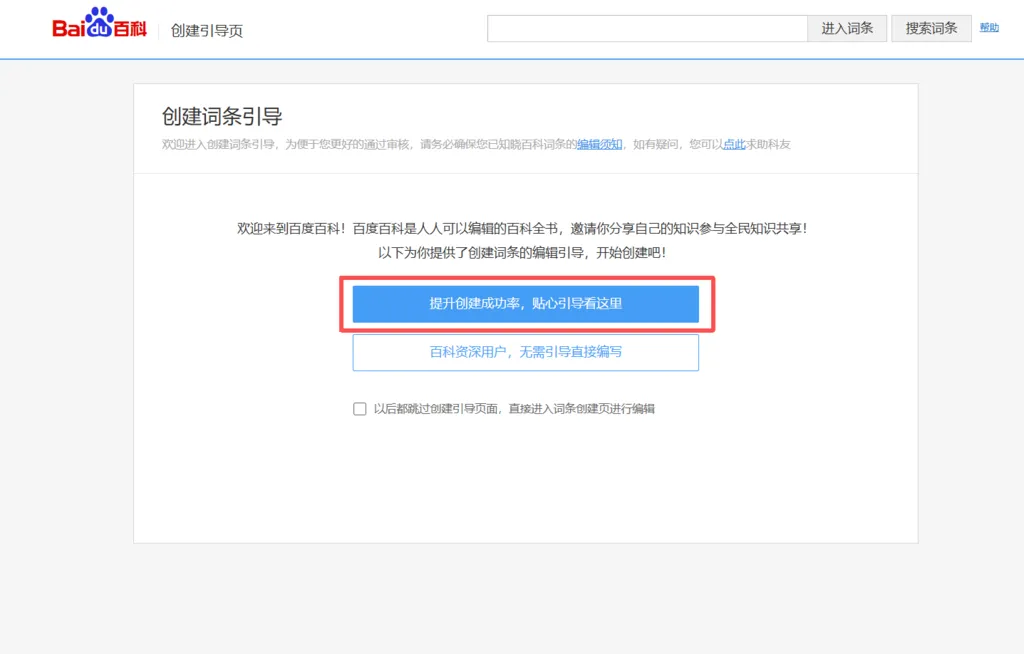
It briefly explains the core principles of page creation, such as what constitutes a compliant page title and which category the page belongs to.
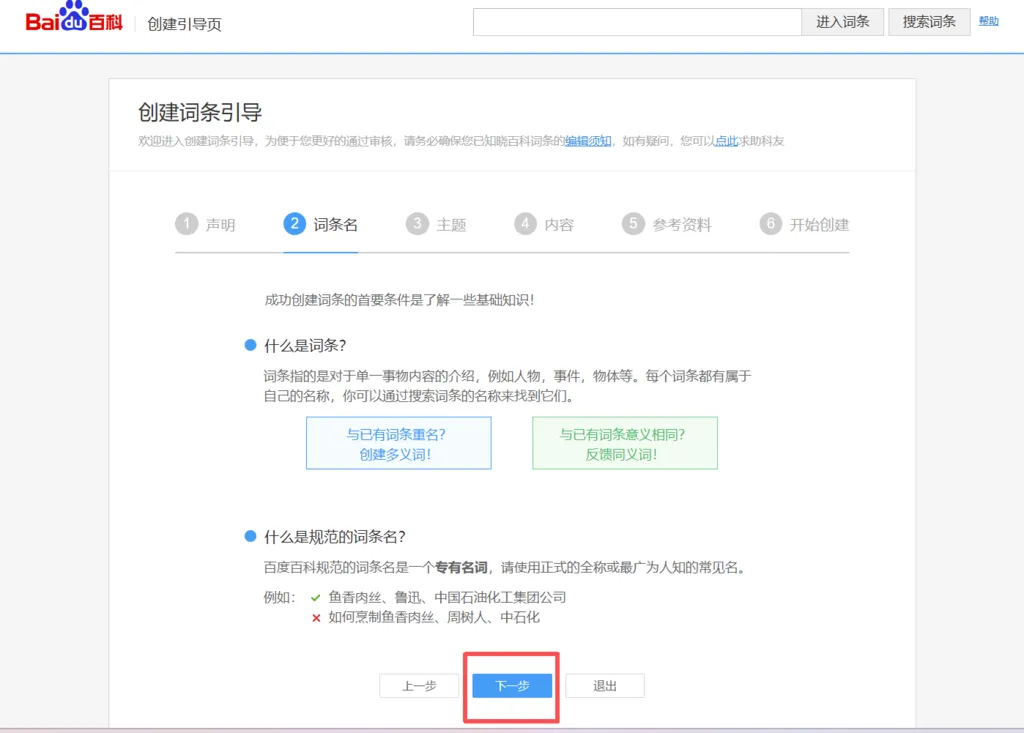
If you select a corporate page, the system will automatically recognize it and direct you to the dedicated “企业创建通道” (Enterprise Creation Channel).
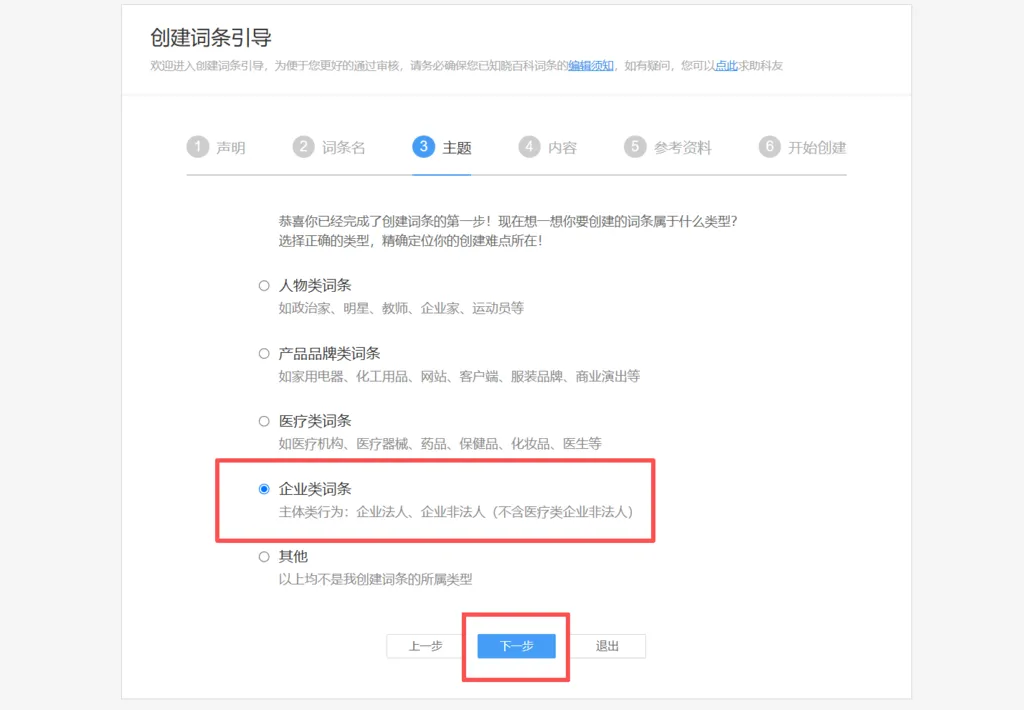
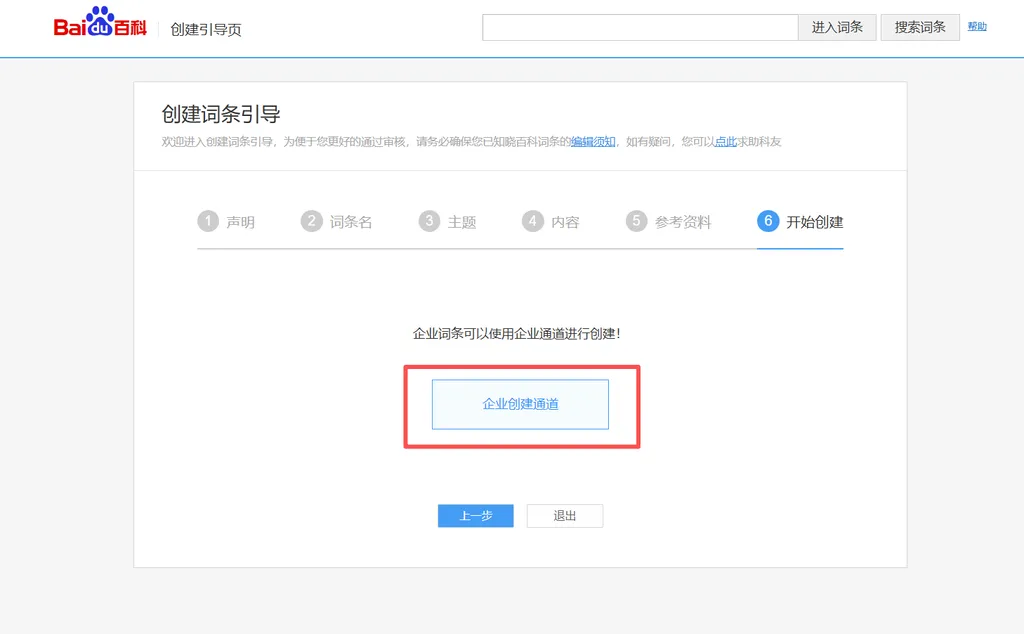
After clicking “企业创建通道” (Enterprise Creation Channel), the default page is the creation portal for companies from mainland China.
If your company is from Hong Kong SAR, Macao SAR, Taiwan region, or from another country or region, click the “国外及港澳台企业创建通道” (Enterprise Creation Channel) option on the page to proceed.
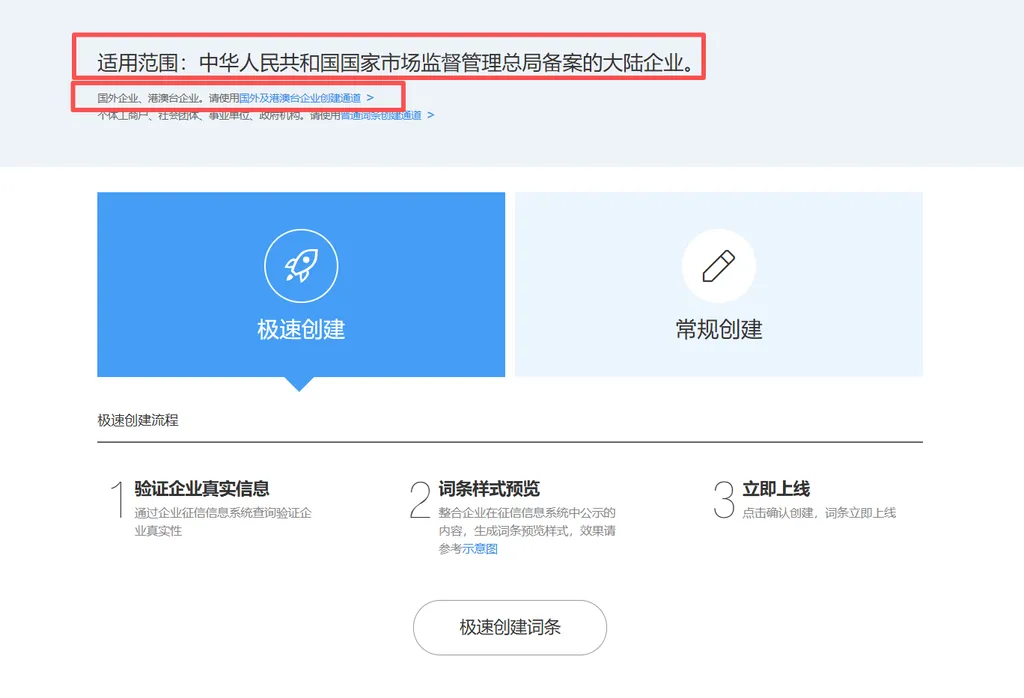
Because review mechanisms vary by place of registration, this section covers two cases: companies from mainland China; and companies from Hong Kong SAR, Macao SAR, Taiwan region, as well as companies from other countries and regions.
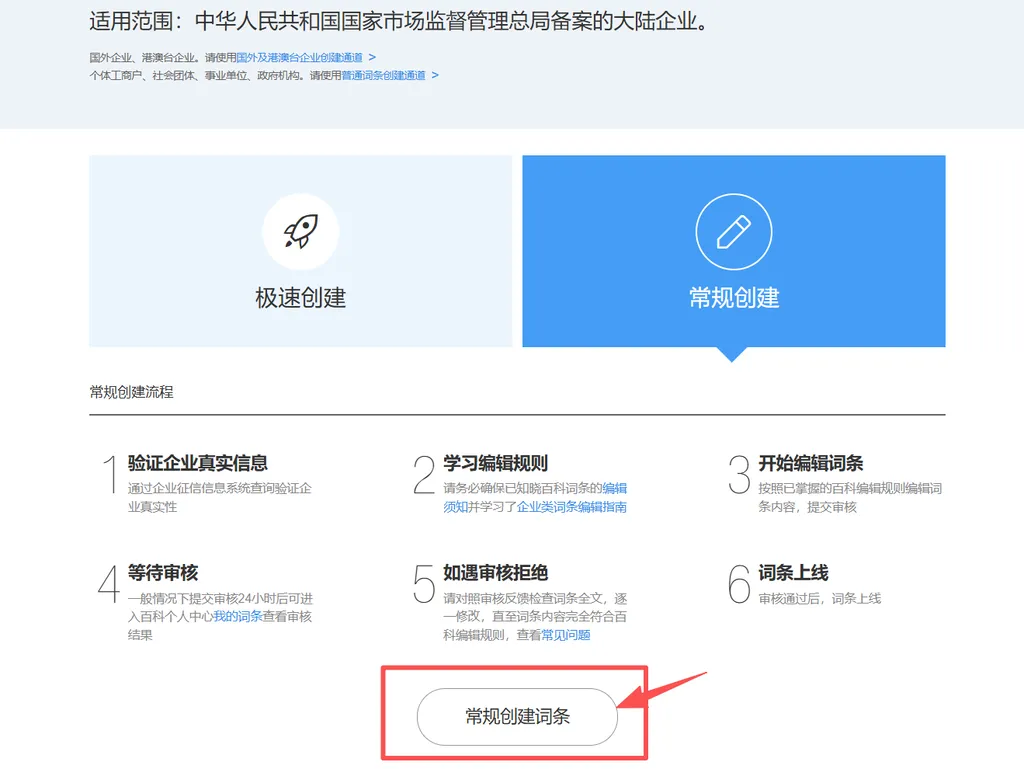
Page creation for companies from mainland China offers two modes: “极速创建” (Quick Creation) and “常规创建” (Standard Creation).
① “极速创建” (Quick Creation)
For Quick Creation, you only need to enter the company name and the Unified Social Credit Code (USCC).
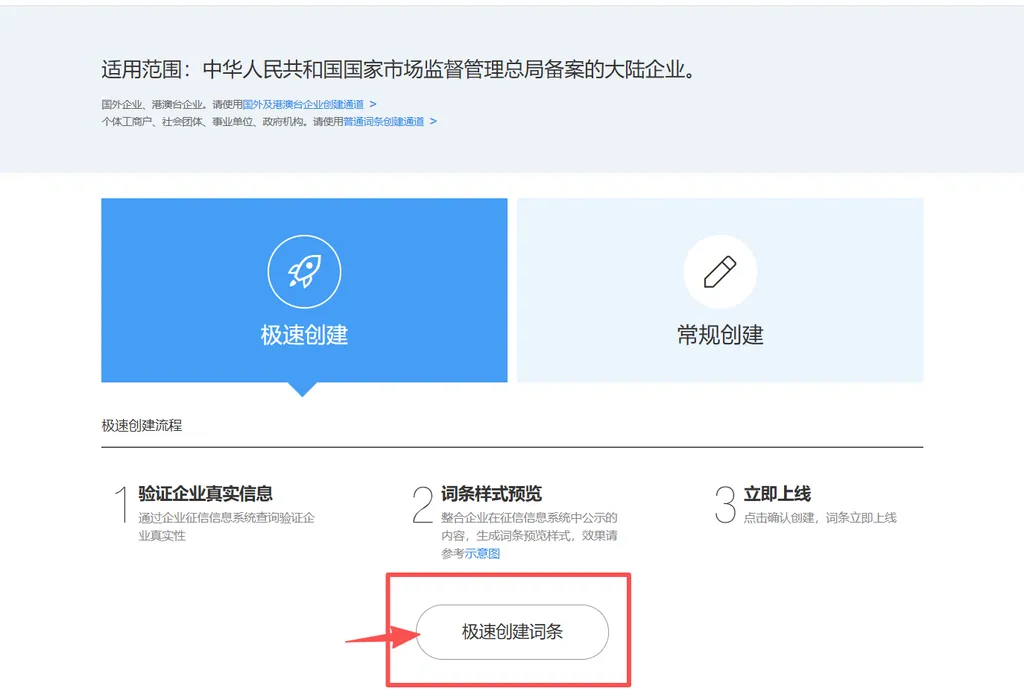
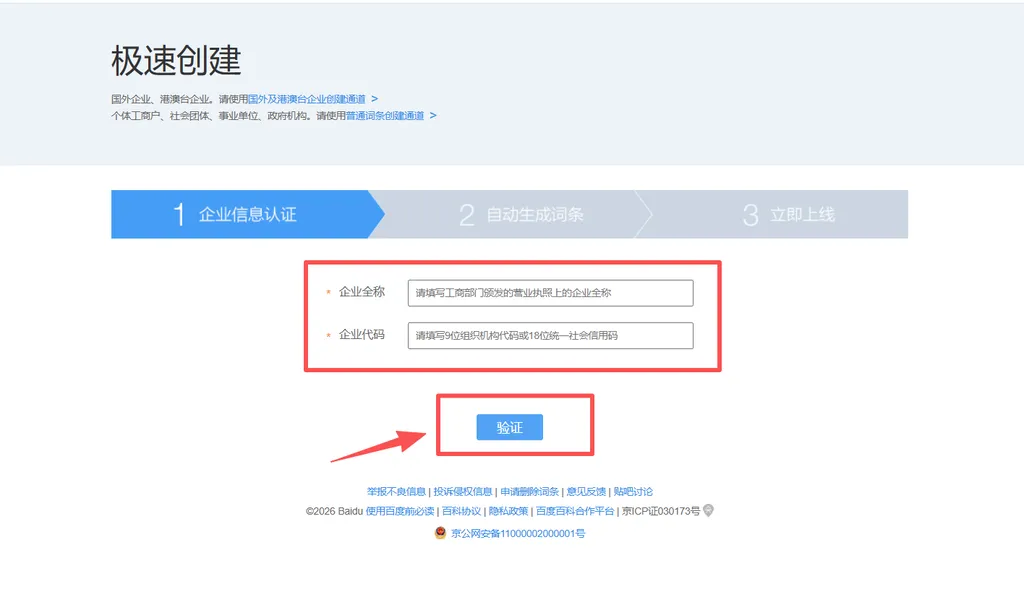
After verification, the system will automatically generate a page based on publicly available information in the Enterprise Credit Information System.
Once you confirm that the preview is correct, click “确认创建” (Confirm Creation), and the page will be published immediately.
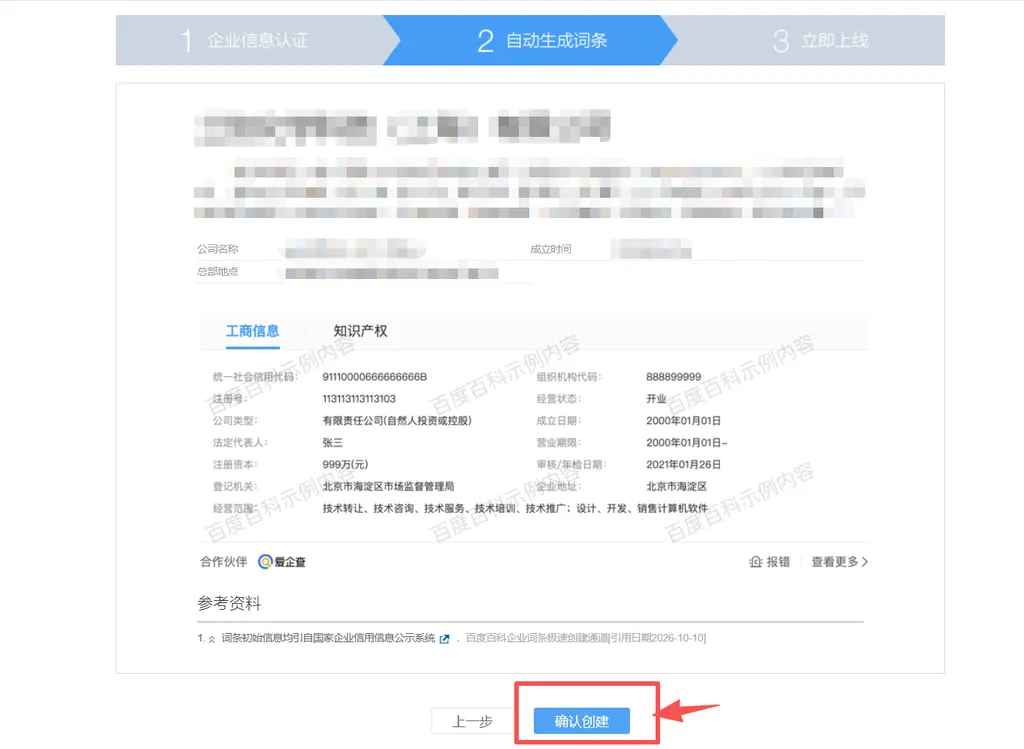
* After publication, you can continue editing the page to gradually add information such as company history, honors and awards, and business overviews to enrich and refine the content.
② “常规创建” (Standard Creation)
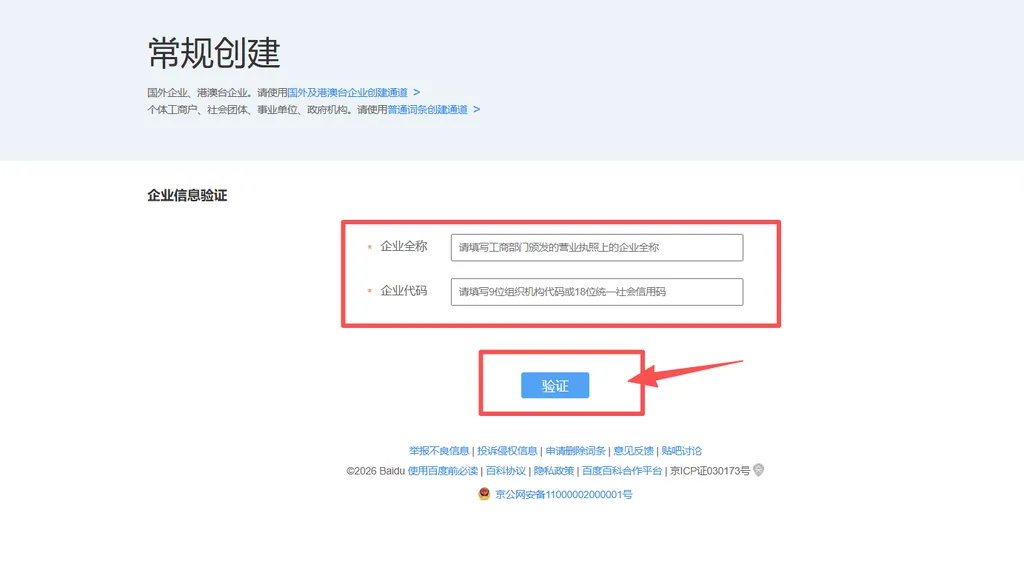
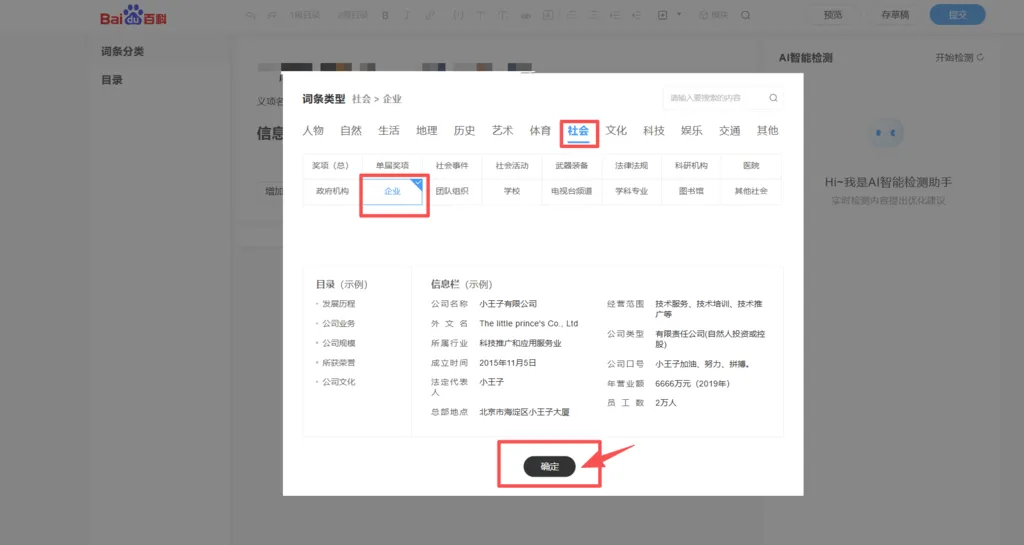
In addition to entering the company name and USCC, Standard Creation requires you to select the corresponding page category after verification. The corporate category is located under the “社会” (Society) category.
Click “确认” (Confirm) to enter the editing page.
○ “义项名” (Disambiguation Descriptor): Enter the nature or defining characteristics of the company (e.g., a real estate company established in 1988 or a Fortune Global 500 company).
* Do not use subjective or exaggerated wording, such as “领先” (leading), “知名” (well-known), or “第一” (No. 1), in the disambiguation descriptor.
○ “概述栏” (Overview Field): Enter a brief company overview (e.g., Dafeng Company was founded in 1988, with core businesses covering real estate, travel agencies, and other sectors, and a registered capital of RMB 10 million…).
○ “概述图” (Overview Image): Upload the company logo to the right of the Overview Field.
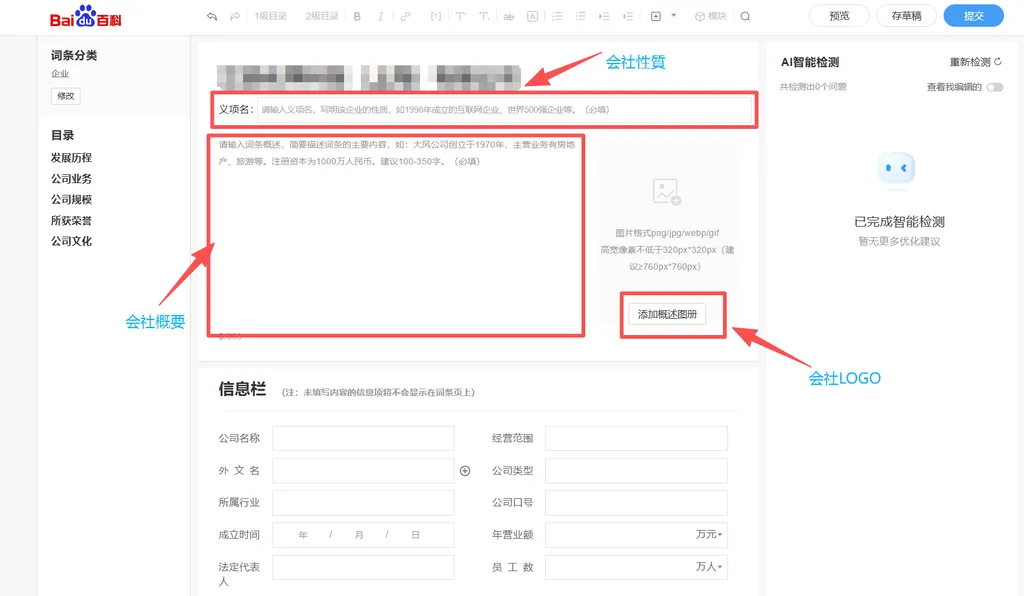
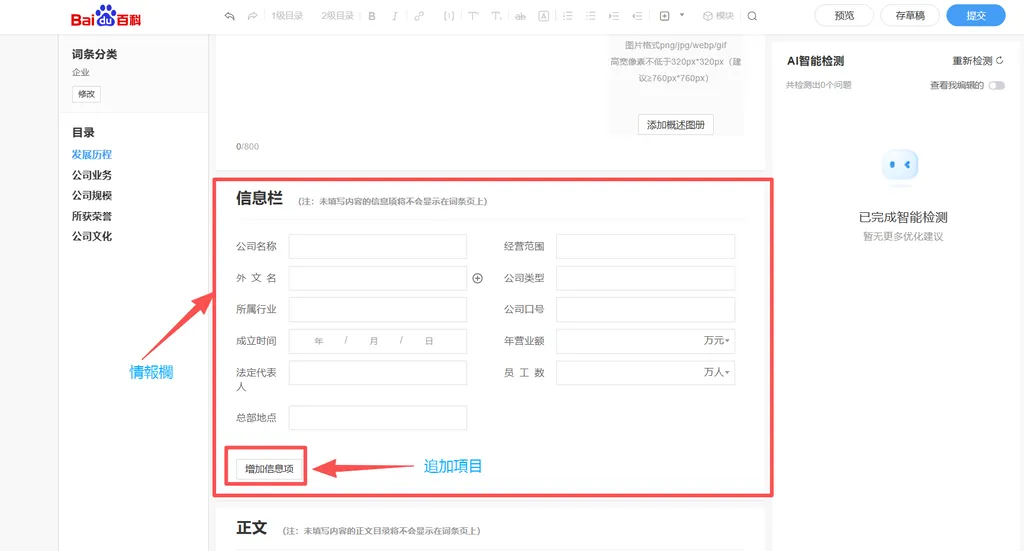
○ “信息栏” (Information Field): Displays core information related to the page (e.g., founding date, legal representative, registered capital). You can add and edit fields as needed.
Fields left blank will not appear on the published page.
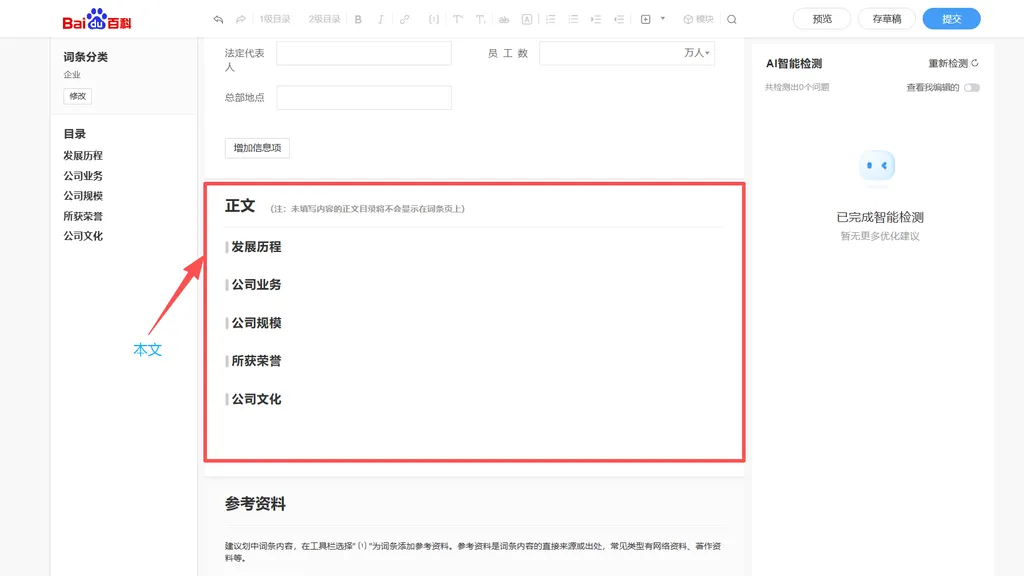
○ “正文” (Main Content): Describe the company in detail.
You can fill it in using the system-provided template (Company History, Business Overviews, Company Size, etc.), or edit the content freely.
You can also insert images, tables, and videos into the main content.
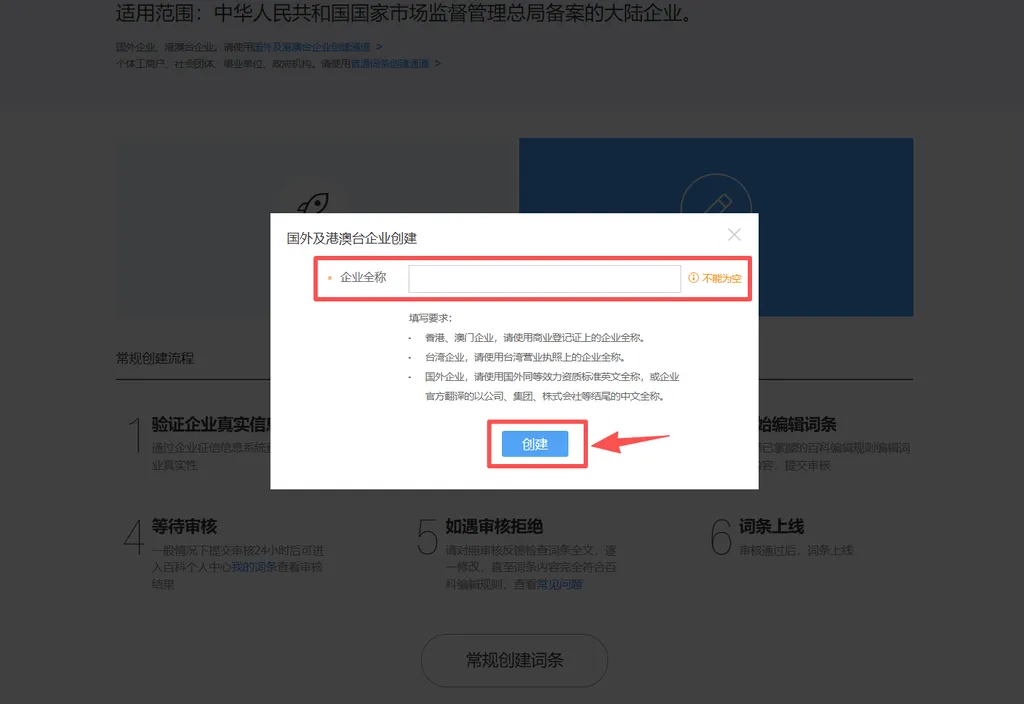
After clicking the dedicated creation portal, enter the company name and click “创建” (Create).
* For companies from other countries, use the full English name as shown on a qualification document of equivalent legal effect in the company’s home country, or the company’s officially translated full Chinese name ending in “公司” (Company), “集团” (Group), or “株式会社” (Kabushiki Kaisha).
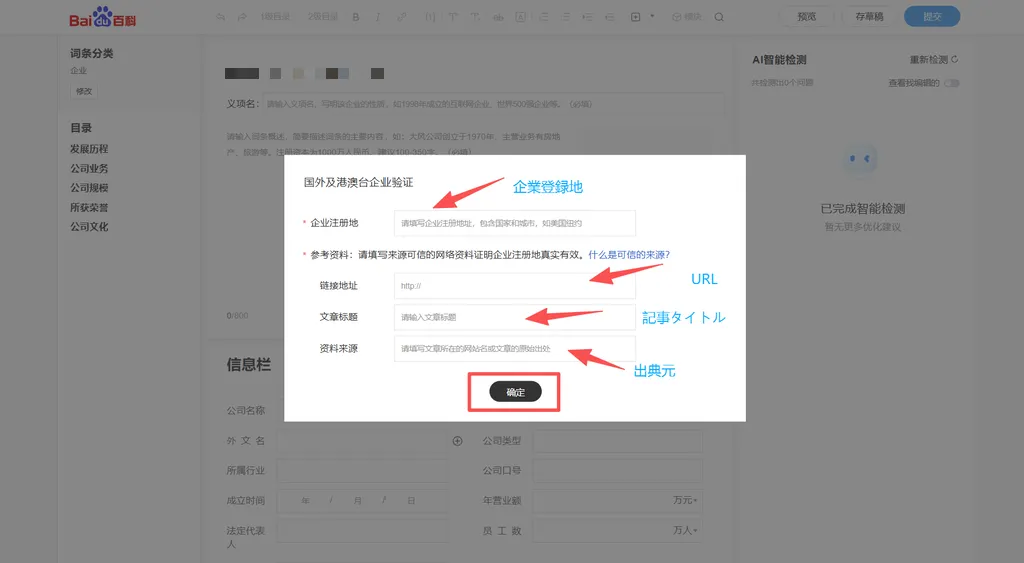
After entering the verification page, you need to fill in “企业注册地” (Company Registration Location) and provide a credible “参考资料(网址)” (Reference URL) to prove that the company’s registration location is authentic and valid.
In addition, you also need to provide the “文章标题” (Article Title) and “原始出处” (Original Source) of the reference.
After verification, the subsequent editing steps (Disambiguation Descriptor, Overview, Information Field, and Main Content) are identical to those in “常规创建” (Standard Creation) for Mainland China companies.
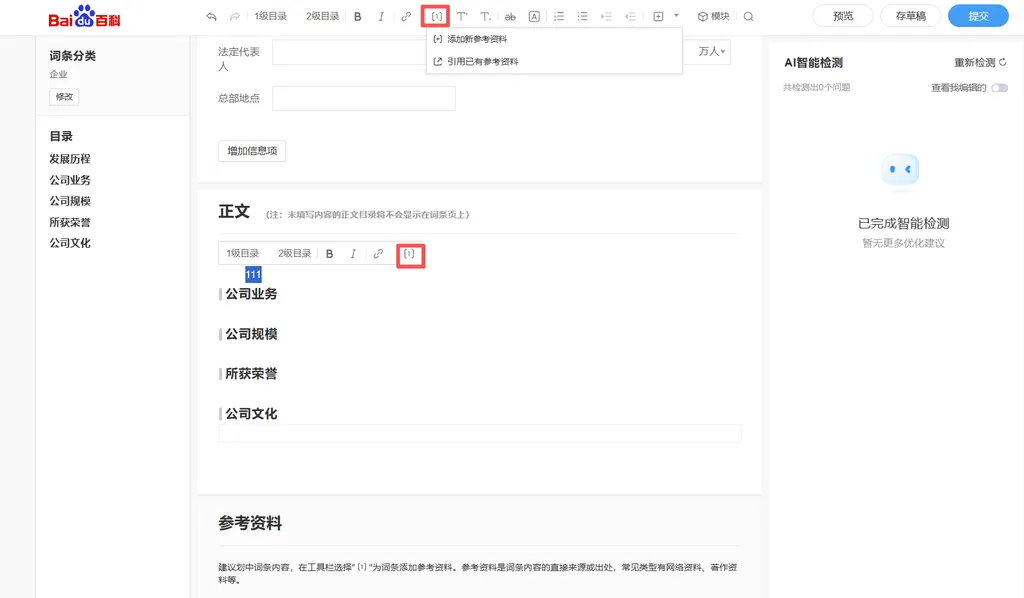
Whether the company is from Mainland China, Hong Kong SAR, Macao SAR, Taiwan region, or other countries and regions, you must add “参考资料” (References) to every factual statement in the “正文” (Main Content) and “信息栏” (Information Field), such as founding date, business scope, and honors and awards.
Select the content you want to add a reference to, then click the “〔1〕” button in the top toolbar to add a new reference or edit an existing one.
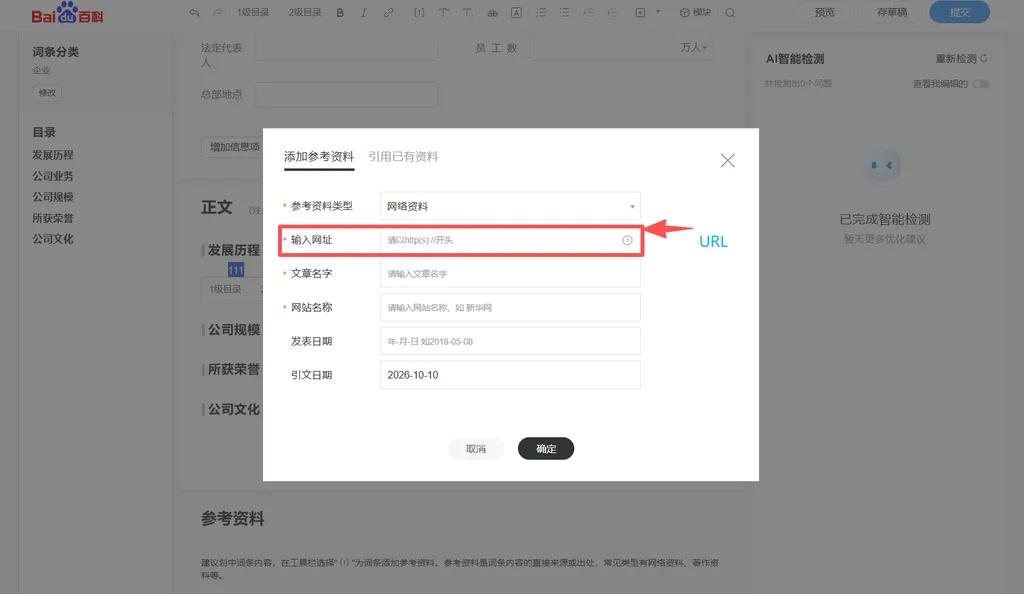
References fall into three categories: “网络资料” (Online Sources), “著作资料” (Published Works), and “其他资料” (Other Sources).
When using Online Sources, paste the URL into the input field, and the system will automatically retrieve the article title and website name. However, you need to check whether the retrieved information matches the content of the linked page. If it does not, edit it manually.
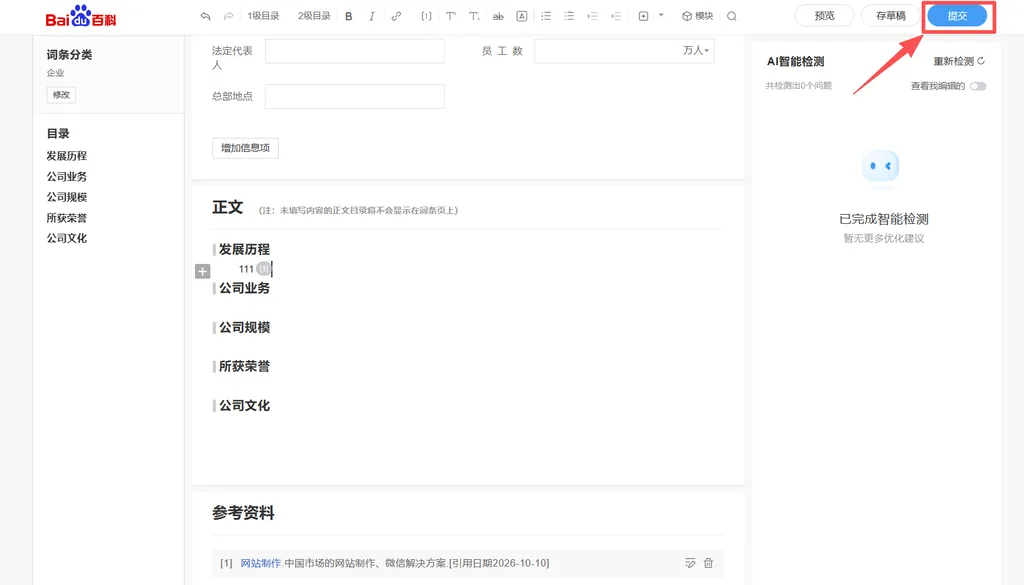
Once all content is complete, click “提交” (Submit) in the top-right corner.
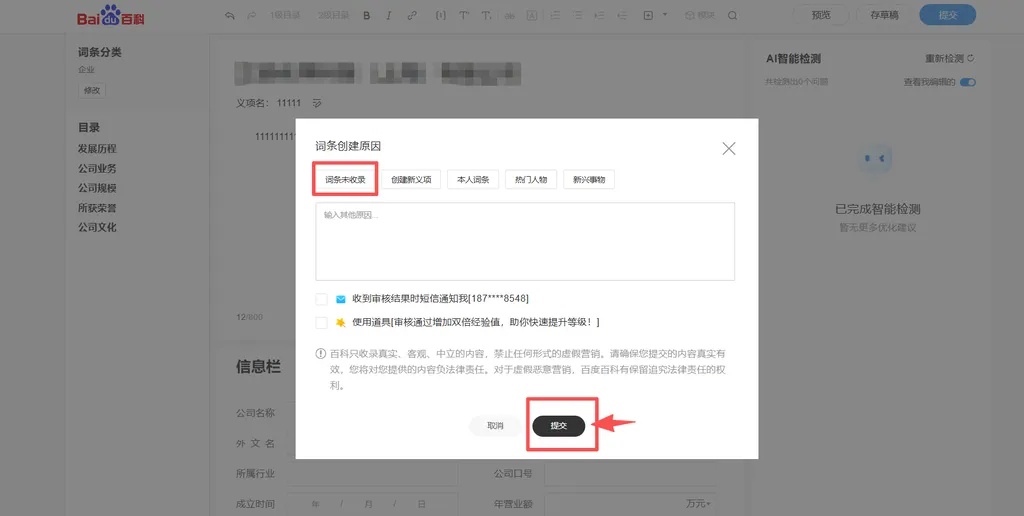
After entering the reason for creating the page (e.g., “该词条未收录”, meaning the page is not yet listed), click “提交” (Submit) again.
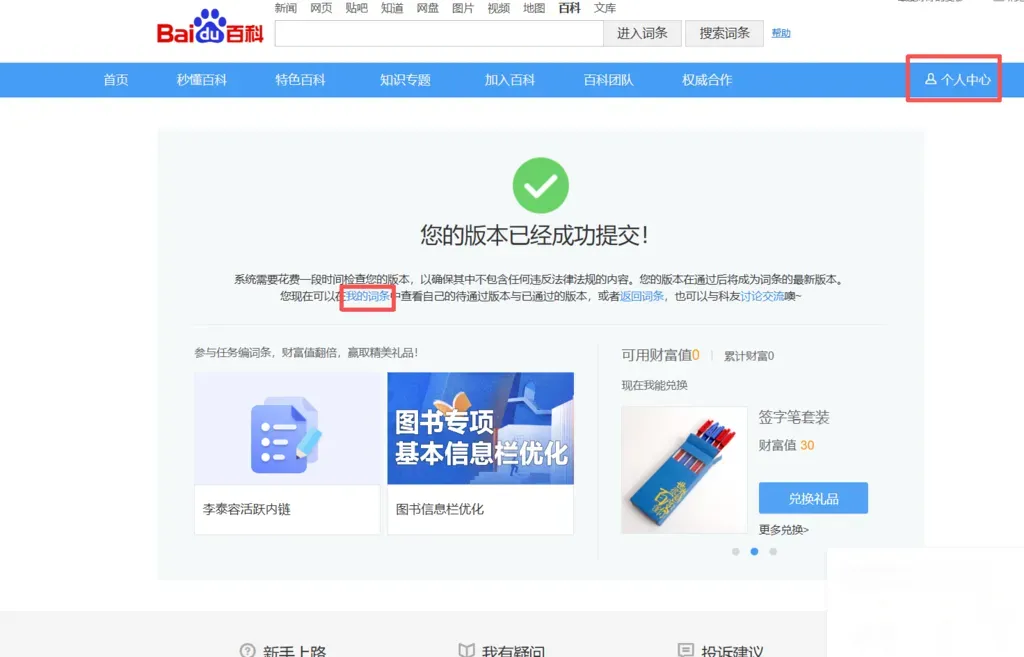
After submission, you need to wait for official review.
You can check the review status at any time on your “个人主页” (Personal Homepage) on Baidu Baike: “已通过” (Approved), “待通过” (Pending), or “未通过” (Rejected).
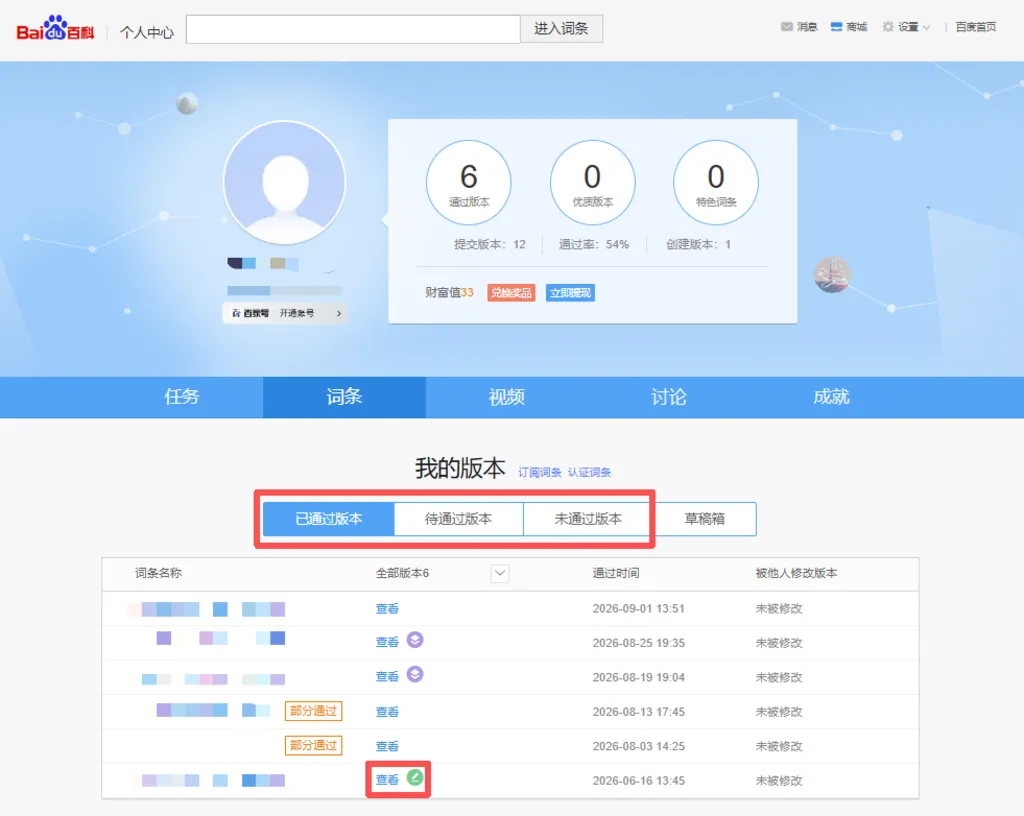
* If a green icon appears next to the page, it means you created that page.
Creating a Baidu Baike page for your company is a vital part of online brand building.
A well-structured, comprehensive page can effectively enhance brand credibility and search visibility.
At the same time, publishing a page is not a one-time task; we recommend regular maintenance and updates as your company grows.
We also hope this article helps you successfully create your company’s Baike page.
● The information above is current as of November 2026. For detailed guidelines and the latest updates, please refer to the official documentation.
● This article is intended to share knowledge and information about Baidu Baike and does not provide page creation, application submission, or any other related services on behalf of users.
When using services provided by Baidu (such as Baijiahao and Baidu Baike), please ensure compliance with Baidu’s latest terms of use and the operating rules of each platform.
● Editing Guidelines for Company Pages
https://baike.baidu.com/item/%E4%BC%81%E4%B8%9A%E7%B1%BB%E8%AF%8D%E6%9D%A1%E7%BC%96%E8%BE%91%E6%8C%87%E5%8D%97
● Rules for References on Baike Pages
https://baike.baidu.com/item/%E7%99%BE%E5%BA%A6%E7%99%BE%E7%A7%91%EF%BC%9A%E5%8F%82%E8%80%83%E8%B5%84%E6%96%99?fromtitle=%E5%8F%82%E8%80%83%E8%B5%84%E6%96%99&fromid=5718004#2
| Website Development | https://beyond-shenzhen.cn/en/service/website |
| China Market Entry Solutions | https://beyond-shenzhen.cn/en/service/china-market-entry |
For Website Development & WeChat Solutions
▼ WeChat Official Enterprise Account ▼

▼ Contact Inquiry Desk on WeChat ▼


 WeChat Official Account
WeChat Inquiry Desk




 【2026】Public Holiday Calendar for China, Japan, & Singapore